Summary
We're changing how verification and Explore work, and we'll announce the switch-over date in advance. We only take requests from notable people and organisations, who can email support@fluxer.com for the verified checkmark on their official community. In the same email, they can ask for that community to be in the built-in Explore list.
What's changing?
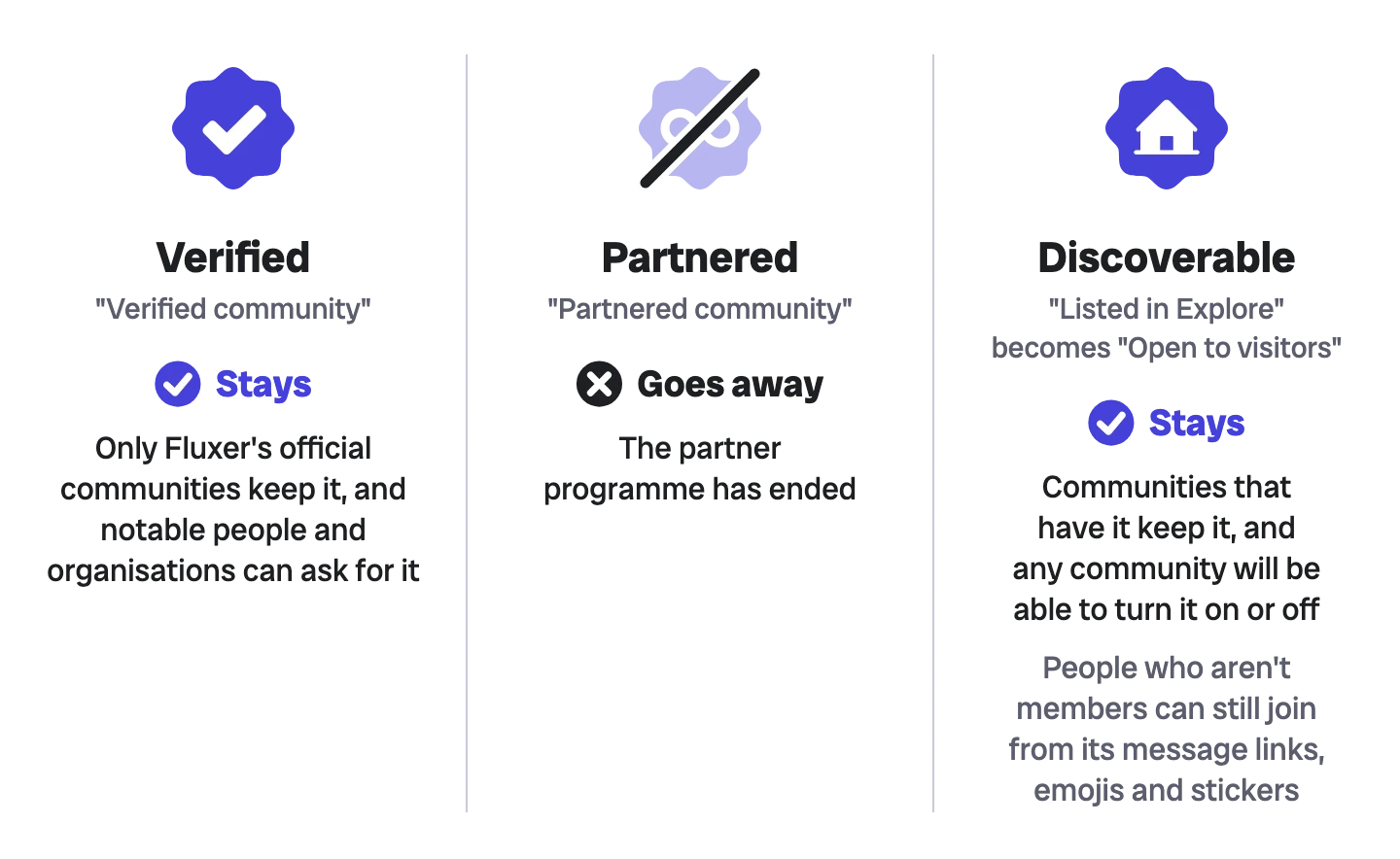
Most of the changes below start on the same day, which we call the switch-over, and we don't have a date for it yet. The partner programme has already ended.
- The verified checkmark, which the app shows as "Verified community", will only be for Fluxer's official communities, the ones our team runs, and the official communities of notable people and organisations that email us to ask for it. At the switch-over, every other verified community will lose it unless we've approved its request.
- The partner programme has ended, and the "Partnered community" badge will go away at the switch-over, including for communities that have it today.
- The Discoverable badge stays, and its label in the app will change from "Listed in Explore" to "Open to visitors". It will stay on for communities that have it, and any community will be able to turn it on or off with no review. The badge will keep doing everything it does today, except that it won't mean a community is listed in Explore.
- Every community without the verified checkmark will be able to show which website or project it belongs to with domain verification. It will work the same way as connecting a domain to your profile, which you can already do today.
- Explore will show what's in Explore lists. We run the built-in Explore list, and every other Explore list will be run by a directory, which is a person or group outside Fluxer. A directory's Explore list can include communities, bots and themes.
- The built-in Explore list is what Explore shows today, and it isn't a directory. After the switch-over it will only include Fluxer's official communities and verified communities that ask us to list them. Every other community can ask directories to list it.
What does the Discoverable badge do?
The badge does all of this today, and it will keep doing it after the switch-over.
- When someone shares a link to a message in a Discoverable community, people who aren't members can press it to join and go to that message. This only works in channels where @everyone can view the channel and read its message history.
- People who aren't members can also join by pressing one of the community's emojis or stickers when someone uses it in another community or a direct message.
- While a community has paused invites, nobody can join it these ways.
- In channels that aren't marked 18+, flagged media is refused whatever the community's explicit content filter is set to, even when it's set to "Off".
- The community's "Member verification level" can't be lower than "Low".
- People who aren't members can report the community.
Today you have to join to read a message from a shared link. We plan to let you look around a Discoverable community and read its messages before you decide to join.
Why are we making these changes?
- The verified checkmark means one thing, that a community is run by our team or is the official community of a notable person or organisation. Past that line there's no clear or fair test, and we don't want to decide case by case who deserves one.
- We never found anyone who really qualified for a partnership. The one community that would have also qualifies for the verified checkmark, and one badge is simpler.
- Any community will be able to turn on the Discoverable badge with no review and let people who aren't members join it from its message links, emojis and stickers.
- Every community without the verified checkmark will be able to show which website or project it belongs to with its own domain, without asking us or waiting for a review.
- Because our own list will only include our own communities and verified communities that ask, we don't have to judge which other communities deserve a place in it.
- People will be able to build Explore lists around many more interests and languages than one company could, and you'll be able to add any of them to your Explore.
- Directories will be able to run their Explore lists by their own rules, and anyone will be able to add them. We won't decide what goes in their lists.
- Our small team will spend the time we used to put into reviewing Explore applications and partner requests on reports and on keeping everyone who uses Fluxer safe.
Can I still ask for verification or a place in Explore?
Only if you're a notable person or organisation and want the verified checkmark for your official community. In the same email, you can ask for that community to be in the built-in Explore list. You'll find how to ask for the checkmark further down. We don't take other verification, partner or Explore requests, by email or anywhere else, including Fluxer HQ, messages to our team, social media, GitHub and Fluxer Feedback.
- We've stopped reviewing Explore applications, even ones already sent, and you don't need to withdraw yours. The "Explore" tab in "Community settings" still shows the form until we change the app, and we don't review what's sent through it.
- The partner programme has ended, and we don't take partner requests.
What can I do instead?
- After the switch-over, anyone with the "Manage community" permission in your community will be able to turn the Discoverable badge on or off, with no review.
- After the switch-over, you'll be able to show which website or project your community belongs to with domain verification, which you set up yourself.
- You can already ask websites that list Fluxer communities to list yours. Once we publish how Explore lists work, which we plan to do before the switch-over, those websites will be able to become directories, and they and other directories will be able to include your community in Explore lists that anyone can add in the app.
- For anything else, like reports, appeals or help with your account, you can always email support@fluxer.com, and a person on our team will get back to you.
Can I get a custom invite link?
Existing custom invite links on fluxer.com stay when verification and Explore change. An inactive community may have its link freed up after 60 days, and we still act on copyright and trademark claims and on links that break our community guidelines. There's no form to ask for a custom invite link yet, and we plan to offer one on fluxer.com.
Who counts as a notable person or organisation?
A person or organisation is notable if at least one of these is true.
- They have their own article on Wikipedia, in any language. Drafts, user pages and articles that Wikipedia has marked for deletion don't count.
- At least two established news outlets, in any country or language, that are independent from them have written in-depth articles about them. Short mentions, interviews they set up, press releases and articles they wrote or paid for don't count.
- They're a government agency, such as a national, regional or local authority.
A company, university or non-profit is notable when it meets the first or second test, whatever its size. None of these make anyone notable on their own.
- Follower, member or download counts, GitHub stars and app store ratings.
- Their own website, channels or press releases.
- Partner or verified status on another platform.
- How large their community is on Fluxer or on another platform.
We use the same tests for everyone, whatever their country, language or politics.
The checkmark goes on a community. To get it, all of these must also be true.
- It's their official community, and their own website or social media links to it.
- The owner and every moderator use two-factor authentication, and the owner's account has no active suspension or other enforcement action from us.
How do I ask for the checkmark?
If you meet all of this, email support@fluxer.com with the subject "Notable verification". If you can, send it from an address on your official domain, and include these links. If you'd also like the community in the built-in Explore list, say so in the same email.
- An invite link to your Fluxer community.
- One or two links that show you're notable.
- The page on your website or social media that links to the community.
We only add the checkmark once we've confirmed that the community is really theirs. We may remove it if a community stops meeting these requirements, gets a new owner who doesn't speak for them, or misuses it. We tell the owner why, and they can appeal.
What happens after I email you?
- If we approve your request before the switch-over, your community gets the verified checkmark right away and keeps it through the switch-over.
- If you don't hear from us within 28 days, your request wasn't approved.
- You can send a new request at most once every 3 months.
What is domain verification?
Domain verification will let a community show which website or project it belongs to, by proving that the people who control its domain, such as example.org, added it. It isn't available yet, and it will be optional. It will work like domain connections on your profile, which you can already add under "Connections" in your user settings.
On your profile, you prove that you control a domain in one of two ways.
- Add a DNS TXT record on
_fluxer.example.orgwith the value from Fluxer. - Put the file from Fluxer at
https://example.org/.well-known/fluxer-verification, which works if you can't change your domain's DNS records.
Fluxer checks the record or the file, and the domain shows on your profile with a mark that says it's verified. We plan for communities to use the same two ways, and for the domain to show on the community the same way it shows on a profile.
Why domain verification?
Domain verification will be open to any community that isn't verified.
- You'll set it up yourself, without waiting for us to review it.
- Anyone can check the proof on your domain without having to trust us.
- It will be open to every project and organisation, whatever its size, including open source projects, game studios, clubs, streamers and small businesses.
- It shows that the people who control your domain added it to your community. A community that pretends to be you can't show your domain.
- Anyone can visit the domain and decide whether they trust the project.
- It shows who a community belongs to without implying that we endorse it.
- Directories can check it when they decide what to list.
- Nobody can get the proof without controlling your domain. We can still remove it if it's used to impersonate someone or to break our community guidelines.
How will Explore work?
Explore will show what's in the built-in Explore list, in the lists of directories we suggest and in the lists you add. A directory is a person or group outside Fluxer that runs an Explore list, which can include communities, bots and themes. We plan to publish how Explore lists work before the switch-over, so anyone can run one. We'll only switch over once the app can show directories' lists in Explore and you can add lists yourself.
Some people already run websites that list Fluxer communities, and you'll find some in our community resources. Once we publish how Explore lists work, those websites can run Explore lists too, and you'll be able to add them to Explore in the app.
Our community guidelines apply to every community, bot and theme on fluxer.com, whichever list includes it. If something in a list breaks them, you can report it to us as usual, and we review every report in good faith. Each directory will still decide what goes in its own list, and we won't review what a list includes before it shows up.
What is the built-in Explore list?
The built-in Explore list is the one list we run, and Fluxer doesn't run a directory of its own. After the switch-over, it will only include Fluxer's official communities and verified communities that ask us to list them, and it won't include bots or themes at all.
Notable people and organisations ask for their verified community to be listed in the same email as the checkmark. Anyone else can ask directories.
The built-in Explore list will be on by default, and you'll be able to turn it off.
How will I add an Explore list?
The app will show the lists of the directories that we suggest right in Explore, so you won't need to visit other websites to use them. You'll also be able to add the list of any other directory you want yourself, and there will be two ways to do that.
- A directory can put an install button on its website, and pressing the button opens the directory's Explore list in the Fluxer app so you can add it.
- You can paste the address of an Explore list into the app.
Any other list will only show up when you add it, and you'll be able to remove it.
The app will load a directory's list from the directory's own server, including the lists of directories we suggest. The directory will be able to see your IP address when you add or view its list, the same as when you visit its website in a browser.
How can a directory get suggested in the app?
We may suggest well-run directories in the app, and directories can't pay to be suggested. We'll announce when directories can contact us, and we'll publish what we look for at the same time. A suggestion isn't a partnership, and it doesn't mean we endorse the directory or what it lists. We'll stop suggesting a directory when its list stops looking well run to us.
What about self-hosted instances?
On a self-hosted instance, the instance's admins decide which communities its built-in Explore list includes and who gets the verified checkmark, and they can turn the list off for their instance. Today, our verified checkmark only applies on fluxer.com.
For federation between Fluxer instances, the plan is that a checkmark always shows which instance gave it, such as "Verified by fluxer.com" for a community we verified.
What happens at the switch-over?
We don't have a date yet, and we'll announce it in advance. The switch-over will only happen once the app can show directories' lists in Explore and you can add lists yourself.
- Fluxer's official communities will keep the verified checkmark.
- Every other verified community will lose the checkmark, including those of notable people and organisations, unless we've already approved their request. Notable people and organisations can email us to ask for it under the new requirements before or after the switch-over. If we approve a request before the switch-over, the community gets the checkmark right away and keeps it through the switch-over.
- Every community without the checkmark will be able to show which website or project it belongs to with domain verification, which it sets up itself with no review.
- The "Partnered community" badge will go away.
- The Discoverable badge's label will change from "Listed in Explore" to "Open to visitors". The badge will stay on for communities that have it and keep working as it does today, except that it won't mean a community is listed in Explore. Anyone with the "Manage community" permission will be able to turn it on or off.
- Communities in the built-in Explore list today stay listed until the switch-over, which gives you time to ask directories to list yours. After that, the list will only include Fluxer's official communities and verified communities that ask us to list them.
These changes apply to every community on fluxer.com, whatever its size or topic. Losing the verified checkmark, the "Partnered community" badge or a place in the built-in Explore list says nothing about your community or the people who run it.